The Tookitaki FRAML Prevention API enables you to integrate your systems with our services. Our API follows the REST convention and accepts and returns JSON data.
All API requests must be made over HTTPS; calls made over plain HTTP will fail. API requests without authentication will also fail - see the Authentication section for information on correctly authenticating calls to the Tookitaki API.
Get Started
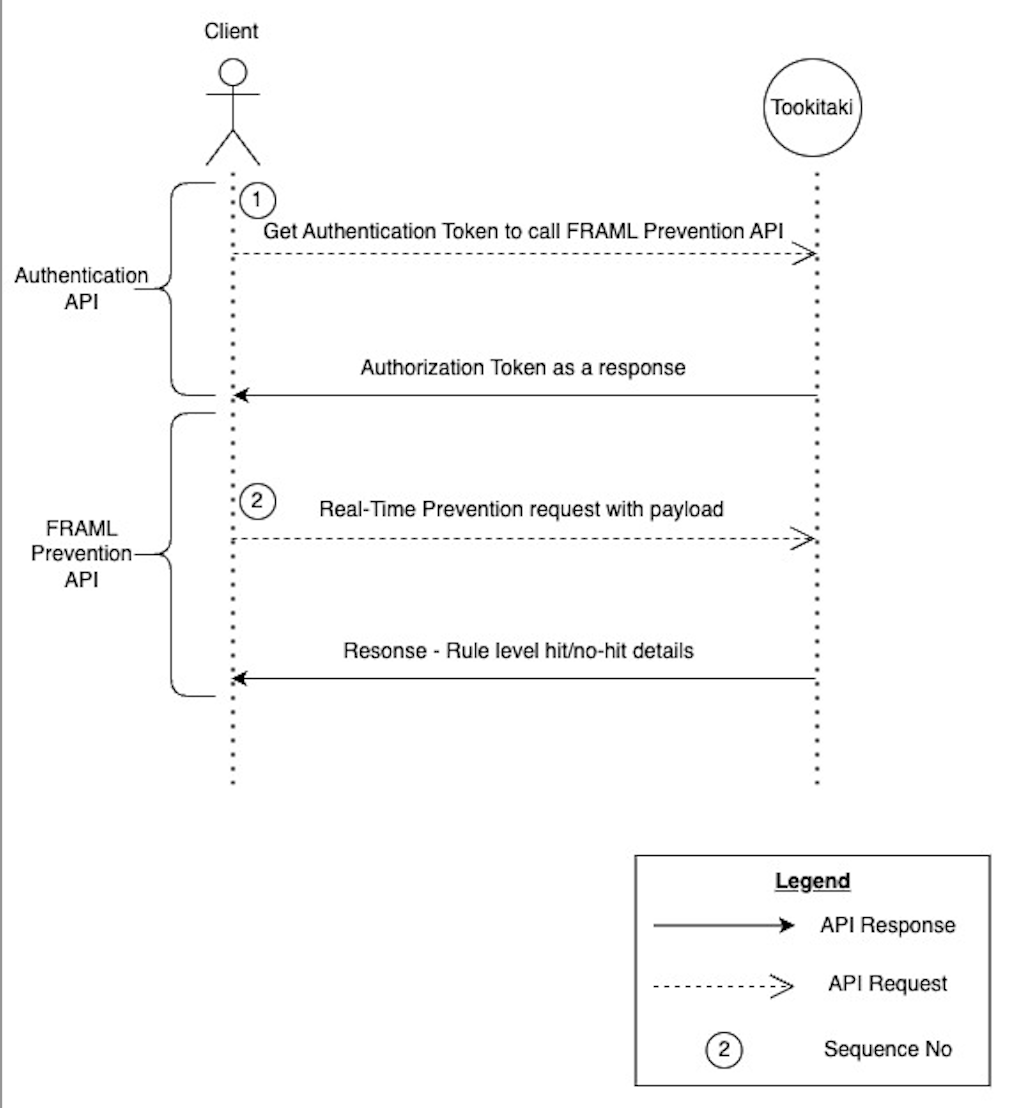
In order to start using FRAML Prevention real-time API, please follow the below steps to call the API with the right authentication to ensure you get the right results.
Steps 1 is must to get the necessary authorization token. This is only required to be repeated once the already existing token expires post the relevant expiry time. This is to prevent any unauthorized usage of the system.
Refer to the API Reference section for the detailed API Capabilities for both Authentication and FRAML Prevention Real-Time API
API flow Diagram:
Responses & errors
We use standard HTTP status codes to indicate the success or failure of a request to our API.
Authentication API
The API uses API keys to authenticate requests. These APIß keys can be generated using below Auth APIs and must be supplied with each request.
All the API requests (Transaction Screening/ FRAML Prevention) has to hold Authorization header with valid token generated from our internal authentication system (gladiator).
'Authorization Token e9a3b57e-a6df-46a4-8c2b-58749195f93c'
Here is a sample API request you can use to generate an authentication token (Replace the respective app server URL and Referer here) and get the response back (Sample)
header Parameters
| Accept | string application/json, text/plain, / |
| Referer | string |
| Authorization | string Basic dGRzczpUTIzNA== |
Responses
Response samples
- 200
- 400
- 401
- 500
- 504
{- "token": "db32711b-b8db-4959-8a0b-0cc89236ba7d",
- "name": "tdss",
- "userId": 1,
- "roleType": "Product User",
- "rolesList": "[{}]",
- "isPassExpired": false,
- "isResetPassNeeded": false,
- "authTypeInfo": {
- "authType": "SQL",
- "authOptions": "{}"
}
}Realtime FRAML Prevention API
Successful requests to our API will have a 200 HTTP status code; the success and message key-value pairs will detail the status message and the content of the response. Additionally, alert will hold the details for the rule wise alert details.
The various possible alert level messages can be used to verify what a particular variant configured gave back as a response. Below are 5 possible states:
RuleNotTriggered:This suggests that a specific condition within the rule has not been met, preventing the rule from being triggered. All the values required to evaluate the condition is available. Detailed object level for each state is available in the response sample below
RuleTriggered:This implies that a particular condition or set of conditions within a rule has been met, prompting the rule to be triggered. Detailed object level for each state is available in the response sample below.
RuleNotApplicable:This indicates that the rule, regardless of its conditions, is not applicable for the current transaction basis the various conditions. Ex, the rule would be for e-wallet, whereas the current transaction is bank transfer. Essentially, the conditions for the rule to apply might exist, but the rule is deemed unsuitable or unnecessary. Detailed object level for each state is available in the response sample below.
RuleNotApplicableForGroupingKeys:Similar to "Rule Not Applicable," this term specifically relates to situations where rules aren't relevant when considering certain grouping keys. Detailed object level for each state is available in the response sample below.
RuleIncompleteFields:This indicates that there are missing or insufficient pieces of information necessary to satisfy the conditions set by a rule. Detailed object level for each state is available in the response sample below.
Unsuccessful requests to our API will have a non-200 HTTP status code and will contain message and success fields. The message field will contain any further information about the unsucessful request.
In case of FRAML API response, note that the message may have more details about the error.
path Parameters
| productId required | string TDSS product ID |
header Parameters
| Authorization required | string auth token for the user |
Request Body schema: application/jsonrequired
required | object (FraudTransaction) |
| format required | string Format of the payload. Fixed value - "tt_json" |
| topicId | string Externally configurable Kafka topic |
| version | string API version |
Responses
Request samples
- Payload
{- "payload": {
- "transaction_id": "TXN293DJHE8RH83",
- "txn_date_time": "2019-08-24T14:15:22Z",
- "txn_type_code": "CRDTTXN",
- "txn_type": "810,139",
- "txn_geography_risk": "Medium",
- "txn_status": "Pending",
- "purpose_code": "BILLPAY",
- "sender_amount_usd": 0.1,
- "sender_amount": 0.1,
- "sender_currency": "EUR",
- "sender_country": "GER",
- "receiver_country": "USA",
- "receiver_amount": 0.1,
- "receiver_currency": "USD",
- "credit_party": "CreditParty",
- "sending_partner": "SP0001HMZ",
- "sending_partner_code": "P0001JFN",
- "sending_partner_type": "Sender",
- "sending_partner_risk_level": "High",
- "receiving_partner": "Receiving partner",
- "receiving_partner_code": "R0001FQP",
- "receiving_partner_type": "Receipient",
- "receiving_partner_risk_level": "Low",
- "sender_birth_country": "Spain",
- "sender_hashcode": "S0001RGN",
- "sender_advance_hashcode": "SA0001PLC",
- "sender_first_name": "John",
- "sender_last_name": "Doe",
- "sender_state": "Texas",
- "sender_city": "Dallas",
- "sender_address": "34, GH Ave",
- "sender_nationality": "USA",
- "sender_msisdn": "13843984481",
- "sender_id_number": "T198340",
- "sender_id_type": "Passport",
- "sender_postal_code": "13049",
- "sender_occupation": "Salesman",
- "sender_incorporation_date": "2019-08-24T14:15:22Z",
- "sender_country_risk_level": "Low",
- "sender_gender": "M",
- "sender_identifier_hashcode": "SI0001GLW",
- "sender_type": "Sender type",
- "receiver_birth_country": "ENG",
- "receiver_hashcode": "R0001EMX",
- "receiver_advance_hashcode": "RA0001KBY",
- "receiver_first_name": "Jane",
- "receiver_last_name": "Doe",
- "receiver_state": "California",
- "receiver_city": "San Fransisco",
- "receiver_address": "67, PT Street",
- "receiver_nationality": "USA",
- "receiver_msisdn": "13491104893",
- "receiver_id_number": "L015839",
- "receiver_id_type": "Passport",
- "receiver_postal_code": "10391",
- "receiver_occupation": "Shopkeeper",
- "receiver_incorporation_date": "2019-08-24T14:15:22Z",
- "receiver_country_risk_level": "Low",
- "receiver_gender": "F",
- "receiver_identifier_hashcode": "RI0001FGD",
- "receiver_type": "Receiver type",
- "receiver_payer_name": "Payer name",
- "receiver_payer_service": "Payer service",
- "receiver_payer_country": "USA",
- "intermediary": [
- {
- "hashcode": "I0001HMO",
- "advance_hashcode": "IA0001IUR",
- "first_name": "John",
- "last_name": "Doe",
- "country": "USA",
- "state": "North Carolina",
- "city": "Charlotte",
- "address": "92, TE Avenue",
- "nationality": "Singapore",
- "msisdn": "16710834328",
- "incorporation_date": "2019-08-24T14:15:22Z",
- "partner": "IP0001TBN",
- "partner_code": "IP0001TGH",
- "partner_type": "Partner type",
- "payer_name": "Payer name",
- "payer_service": "Payer service",
- "payer_country": "USA"
}
], - "additional_info": "Keywords",
- "aggregated_transaction": true,
- "rfi_sent": true,
- "sender_receiver_relationship": "Spouse",
- "source_of_funds": "Salary",
- "document_reference_number": "DRF0001PYC",
- "external_id": "389492839",
- "external_code": "IVHJHFDVBQ"
}, - "format": "tt_json",
- "topicId": "kafka_pipeline_topic",
- "version": "1"
}Response samples
- 200
- 400
- 401
- 500
- 504
{- "transactionKey": "TXN293DJHE8RH83",
- "alert": {
- "txn": {
- "transaction_id": "TXN293DJHE8RH83",
- "txn_date_time": "2019-08-24T14:15:22Z",
- "txn_type_code": "CRDTTXN",
- "txn_type": "810,139",
- "txn_geography_risk": "Medium",
- "txn_status": "Pending",
- "purpose_code": "BILLPAY",
- "sender_amount_usd": 0.1,
- "sender_amount": 0.1,
- "sender_currency": "EUR",
- "sender_country": "GER",
- "receiver_country": "USA",
- "receiver_amount": 0.1,
- "receiver_currency": "USD",
- "credit_party": "CreditParty",
- "sending_partner": "SP0001HMZ",
- "sending_partner_code": "P0001JFN",
- "sending_partner_type": "Sender",
- "sending_partner_risk_level": "High",
- "receiving_partner": "Receiving partner",
- "receiving_partner_code": "R0001FQP",
- "receiving_partner_type": "Receipient",
- "receiving_partner_risk_level": "Low",
- "sender_birth_country": "Spain",
- "sender_hashcode": "S0001RGN",
- "sender_advance_hashcode": "SA0001PLC",
- "sender_first_name": "John",
- "sender_last_name": "Doe",
- "sender_state": "Texas",
- "sender_city": "Dallas",
- "sender_address": "34, GH Ave",
- "sender_nationality": "USA",
- "sender_msisdn": "13843984481",
- "sender_id_number": "T198340",
- "sender_id_type": "Passport",
- "sender_postal_code": "13049",
- "sender_occupation": "Salesman",
- "sender_incorporation_date": "2019-08-24T14:15:22Z",
- "sender_country_risk_level": "Low",
- "sender_gender": "M",
- "sender_identifier_hashcode": "SI0001GLW",
- "sender_type": "Sender type",
- "receiver_birth_country": "ENG",
- "receiver_hashcode": "R0001EMX",
- "receiver_advance_hashcode": "RA0001KBY",
- "receiver_first_name": "Jane",
- "receiver_last_name": "Doe",
- "receiver_state": "California",
- "receiver_city": "San Fransisco",
- "receiver_address": "67, PT Street",
- "receiver_nationality": "USA",
- "receiver_msisdn": "13491104893",
- "receiver_id_number": "L015839",
- "receiver_id_type": "Passport",
- "receiver_postal_code": "10391",
- "receiver_occupation": "Shopkeeper",
- "receiver_incorporation_date": "2019-08-24T14:15:22Z",
- "receiver_country_risk_level": "Low",
- "receiver_gender": "F",
- "receiver_identifier_hashcode": "RI0001FGD",
- "receiver_type": "Receiver type",
- "receiver_payer_name": "Payer name",
- "receiver_payer_service": "Payer service",
- "receiver_payer_country": "USA",
- "intermediary": [
- {
- "hashcode": "I0001HMO",
- "advance_hashcode": "IA0001IUR",
- "first_name": "John",
- "last_name": "Doe",
- "country": "USA",
- "state": "North Carolina",
- "city": "Charlotte",
- "address": "92, TE Avenue",
- "nationality": "Singapore",
- "msisdn": "16710834328",
- "incorporation_date": "2019-08-24T14:15:22Z",
- "partner": "IP0001TBN",
- "partner_code": "IP0001TGH",
- "partner_type": "Partner type",
- "payer_name": "Payer name",
- "payer_service": "Payer service",
- "payer_country": "USA"
}
], - "additional_info": "Keywords",
- "aggregated_transaction": true,
- "rfi_sent": true,
- "sender_receiver_relationship": "Spouse",
- "source_of_funds": "Salary",
- "document_reference_number": "DRF0001PYC",
- "external_id": "389492839",
- "external_code": "IVHJHFDVBQ"
}, - "ruleAlert": [
- {
- "ruleId": "6ba7b811-9dad-11d1-80b4-00c04fd430c8",
- "typologyId": 255,
- "typologyName": "Large amount of transactions from suspicious source country",
- "ruleName": "More than 100 transactions from suspicious source country Chile",
- "functionValue": { },
- "condition": true,
- "groupingKeys": [
- "sender_hashcode",
- "receiver_hashcode"
], - "action": "Stop",
- "screeningResult": {
- "property1": [
- "string"
], - "property2": [
- "string"
]
}, - "messageType": "RuleNotTriggered"
}
], - "endTime": "string",
- "topicName": "54d00f84-d678-4bb7-adfa-f867f777a0a1",
- "scenarioId": 0,
- "scenarioInstanceId": 0,
- "scenarioName": "string",
- "challengerId": 0,
- "numberOfMessages": 0,
- "arrivalTime": "string"
}, - "version": "1",
- "success": true,
- "message": "success"
}